New jobs
Hi
Class A jobs around Sacramento.
Loading…
Tags like "Home daily" are read from the posting's own words. Open the full posting to be sure.
Class A jobs around Sacramento.
Loading…
Tags like "Home daily" are read from the posting's own words. Open the full posting to be sure.
Jobs you saved stay here, even after the posting is gone from the job sites.
Check a company's official record with FMCSA, the federal trucking safety agency.
For information only. FMCSA records are matched by company name, so check it's the right company before you rely on it.
Search every job in your region by title, company, town or what the posting says.
These filter and mark the jobs for you. Joshua sees them, and your change requests, as you make them.
Which counties to show jobs from.
Anything you want different in the app. Joshua marks each one planned or done.
None yet.
Only Joshua sees this page.
Sign in to this app as you, with Face ID or a fingerprint, instead of typing the admin code. Do this on your own phone or computer.
Keys are kept on the server and never shown again. Leave a box empty to keep the key that's there.
1 a day pulls at 6 am. 2 a day at 6 am and 2 pm. 3 a day at 6 am, noon and 6 pm.
None yet.
None yet.
Put it on your home screen so it opens like an app.
Tap the picture to see it full size.
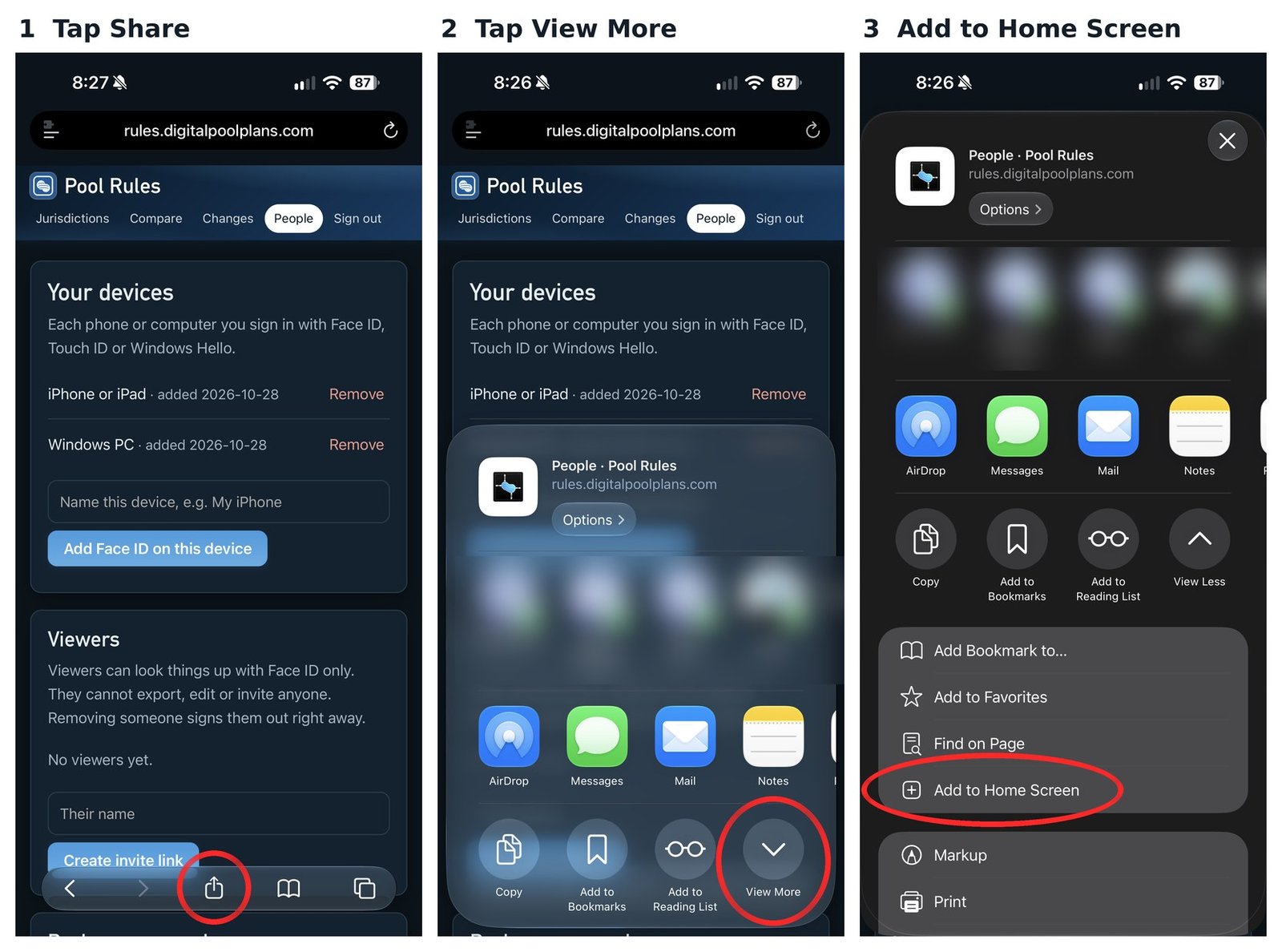
The pictures are from another of Joshua's apps. The steps are the same for Class A.
In Chrome: tap the menu (three dots, top right), then Add to home screen or Install app.
In Samsung Internet: tap the menu, then Add page to, then Home screen.
You sign in with Face ID or your fingerprint. There's no password to remember.
New phone, or Face ID stopped working? Ask Joshua for a new setup link.
How the app looks. Saved on this phone.
Class A is part of Family Endeavors. Built by Joshua.
Job listings come from Adzuna, Jooble and CareerOneStop. CareerOneStop is sponsored by the U.S. Department of Labor, and its postings come from NLx, the National Labor Exchange. Company records come from FMCSA's QCMobile service.